
TruSim Systems Custom Elite Impact Screens

$416.00

TruSim Systems Custom Elite Impact Screens are built to order for your golf simulator in your choice of two triple layer screens: the TruSim Custom Elite Premium Impact Screen (White) or the TruSim Custom Elite Impact Screen (Gray), which absorbs excess ambient light for deeper blacks and sharper visuals in rooms with lighter walls or uncontrolled lighting.

Each screen is cut, sewn and finished in the USA to your exact width and height, up to 10 feet high and virtually any width. Every edge is finished to fit your frame, with options for hook & loop, grommets, rod pockets, angled top corners, frame flaps and custom trim strips.

★ TruSim Systems Custom Elite Impact Screens are custom-made to the customer’s specifications and are therefore non-returnable and non-refundable. ★

📦 This product qualifies for Free Shipping. Item(s) will be drop shipped directly to you from our partner vendors. Shipping times may vary depending on product availability and all items may not ship together or at the same time. Please note: if the product features add-ons that can be selected, certain options may come with their own shipping charge. You’ll be notified prior to checkout of any shipping expenses if applicable.

Estimated Shipping Timeframe: Each screen is made to order. Standard production currently ships in about 3 to 4 weeks with free shipping.*

*Estimated shipping timeframes are subject to change based upon vendor product availability. Ship times are set by the product vendor and are subject to change without notice. Package items may ship separately and arrive on different days.

Need it sooner? Rush production may be available for an additional cost, based on the date you select using the tool below. Ship dates are when your screen leaves the vendor's facility, and transit time is additional.

Custom Impact Screens

Built to Your Exact Screen Size

Every TruSim Systems Custom Elite Impact Screen is cut, sewn and finished in the USA to the width and height you choose, with the edge finishes your frame needs.

  • Up to 10 ftScreen height
  • Any widthBuilt to the inch
  • 2Screen choices, White or Gray
  • 3 to 4 weeksStandard production
TruSim Systems Custom Premium Impact Screen shown in a golf simulator setup

TruSim Systems Custom Elite Impact Screens are professionally finished, precision-built projection screens engineered for demanding golf simulator environments. Designed for residential simulators, commercial bays, training facilities, and portable or fixed installations, each screen is manufactured using high-performance impact fabrics and precision sewing techniques. The result is a durable screen that provides a smooth projection surface, crisp and uniform image quality, consistent ball rebound characteristics, and a lower-noise profile compared with basic impact fabrics. Built for front-projection simulator systems, TruSim screens are compatible with leading simulator brands and projectors.

Every TruSim Systems Custom Elite Impact Screen is made to order and can be manufactured up to 10 feet high with virtually unlimited width, allowing you to create the right screen for your specific simulator enclosure or bay. Choose from two triple layer screens, the TruSim Custom Elite Premium Impact Screen (White) or the TruSim Custom Elite Impact Screen (Gray), and finish each edge with hook & loop, with grommets for attachment. Rod pockets, angled top corners, custom frame flaps and custom trim strips are also available.

Built and finished in the USA, TruSim Systems Custom Elite Impact Screens are backed by Canwil Textiles' decades of textile engineering experience and supply-chain expertise. The design and finishing process has also been refined through direct input from professional simulator installers, helping ensure that sizing, attachment methods, and finishing details are practical for real-world installations. This is a custom-built solution, not a mass-produced screen, giving golf simulator builders and owners the flexibility to specify a screen that fits their space, mounting system, and performance requirements.

*Please note that this product has not been tested or certified to meet fire-retardant (FR) standards; no claims are made regarding fire performance, sprinkler interaction, or code compliance, and material approval should be reviewed with the local AHJ where required.

TruSim Systems Custom Premium Impact Screen shown in a golf simulator setup
  • TruSim Custom Elite Premium Impact Screen (White) or TruSim Custom Elite Impact Screen (Gray)
  • High-impact durability
  • Smooth, crisp projection surface
  • Consistent ball rebound
  • Lower-noise impact performance
  • Up to 10 ft. high
  • Virtually unlimited width
  • Custom width and height
  • Made to order in the USA
  • Hook & loop edge finishes
  • Grommets
  • Rod pockets
  • Angled top corners
  • Custom frame flaps and trim strips
  • Compatible with leading simulator brands

Specifications

OptionDetails
ScreenTruSim Custom Elite Premium Impact Screen (White) or TruSim Custom Elite Impact Screen (Gray), both triple layer, non FR
SizeCustom width and height, in inches
ShapeRectangle or angled top corners
Rod PocketNone, or a top or bottom pocket 1", 2", 3" or 4" deep, within the stated height or added to it
Edge TreatmentsEach edge finished on the front (impact side) and back (frame side)
Hook & Loop1" to 4" widths in black or white, silent versions available
Attachment HardwareNone or grommets: top only, top and sides, or all 4 sides
Hardware Spacing6", 8", 12", 16" or 24" on center, optional tighter spacing near the bottom of the sides
Frame FlapsFabric flaps that wrap your frame and secure on the back
Trim StripsHook & loop strips inside the screen at any distance from an edge

Edges that receive grommets must be reinforced with hook & loop.

Sizing Your Screen to Your Space

Your screen should never be the exact size of your space. It needs room to be tensioned and attached, so plan on at least 6" narrower and 4" shorter.

ExampleSpaceScreen
Width192"186"
Height, tethered along the bottom120"116"
Height, lay flat (not tethered)120"116" plus the 3" rod pocket, 119" overall

The gap left around the screen is covered with Carpet Panel Pads.

TruSim Systems Custom Elite Impact Screens are custom-made to the customer’s specifications and are therefore non-returnable and non-refundable.

Because each screen is individually manufactured to the dimensions, configuration, and finishing options selected at the time of order, we cannot accept returns or exchanges for changes of mind, incorrect measurements, or ordering the wrong size.

Please carefully review all dimensions, specifications, and customization options before placing your order. If your screen arrives damaged or has a manufacturing defect, please contact Garage Golf promptly so we can review the issue and determine the appropriate resolution.

A golfer using a TruSim impact screen in their golf simulator setup
Performance

Engineered for Golf Simulator Performance

TruSim Systems Custom Elite Impact Screens are engineered specifically for repeated golf ball impact while maintaining a smooth surface for front projection. The high-performance impact fabric helps deliver clear, uniform visuals and consistent ball response throughout your simulator setup.

A TruSim impact screen in a golf simulator setup featuring a slanted ceiling
Custom Built

Built to Your Exact Specifications

No two simulator installations are exactly alike. TruSim screens can be built up to 10 feet high and virtually any width, with professionally finished mounting solutions. From hook & loop edges to grommets, rod pockets and custom frame flaps, the screen can be tailored to the way your simulator is constructed.

Closeup of a person sewing the finishing details on a TruSim impact screen
Made in the USA

Professionally Finished in the USA

Each TruSim screen is made to order, cut, sewn, and finished in-house in the USA, drawing on Canwil Textiles' textile engineering experience and professional installer feedback. The result is a custom impact screen designed around real-world installation requirements rather than a one-size-fits-all approach.

The Details

What Goes Into Every TruSim Screen

  • A TruSim impact screen in a golf simulator setup
    Screen Choice

    White or Gray

  • Top corner of the TruSim Systems Custom Premium Impact Screen
    Edge Finishes

    Finished to Fit Your Frame

  • Closeup of the folded screen fabric of a TruSim impact screen showing the texture of the fabric
    Triple Layer

    Made for Repeated Impact

Installation

How a TruSim Screen Goes Up

  1. Framing a golf simulator impact screen to the wall with angle iron or EMT conduit and Carpet Panel Pads

    Frame the Room

    Run angle iron or EMT conduit 1' off the back wall along both side walls and the ceiling, fastened into joists or plywood. The 1' gap lets the ball hit the screen without reaching the wall.

  2. Screen hung inside the angle iron frame with zip ties or ball bungees through the grommets

    Hang the Screen

    Zip tie or ball bungee the screen to the frame through the grommets, along the top and both sides, tensioned without over tensioning.

  3. Rod pocket lay flat method for the bottom of a golf simulator impact screen

    Finish the Bottom

    Tethered along the bottom: attach it like the sides. Not tethered: a 3" bottom rod pocket, added to your screen height, lays flat on the floor. 3" White Hook Velcro on the back of the pocket catches to carpet or turf, or industrial felt Velcro can be stapled through a turf floor into plywood.

  4. Carpet Panel Pads of equal width framing a golf simulator screen

    Add Carpet Panel Pads

    One edge grips the hook Velcro sewn onto the screen, the other grips adhesive hook Velcro on the angle iron, covering the gap for a clean, picture framed border.

Complete The Setup

Add Your Remaining Golf Simulator Items

  1. TruSim Systems Carpet Panel Pads

    TruSim Systems Carpet Panel Pads

    Cover the gap between your screen and frame for a clean, picture framed border.

    View Carpet Panel Pads
  2. Garage Golf PAR Desktop Package by XOTIC PC

    Garage Golf PAR Desktop Package by XOTIC PC

    A simulator ready PC to run your golf software.

    View the PAR Desktop
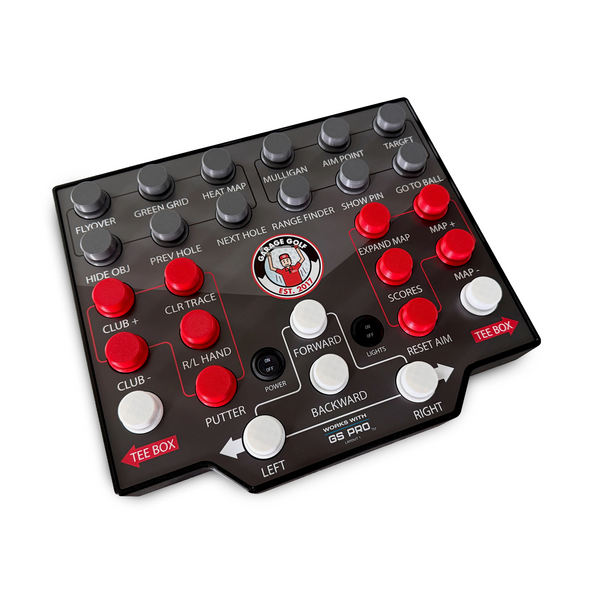
  3. Club Keyboard Pro 4 - 28 Button

    Club Keyboard Pro 4 - 28 Button

    Control your simulator software right from the hitting area.

    View the Club Keyboard
  4. ProTee VX Golf Launch Monitor

    ProTee VX Golf Launch Monitor

    A ceiling mounted launch monitor that tracks every shot.

    View the ProTee VX

Product Videos

TruSim at the PGA Show 2026

Frequently Asked Questions

Yes. Every TruSim Systems Custom Elite Impact Screen is made to order based on your specified dimensions, aspect ratio, and finishing or mounting requirements. Screens can be built up to 10 feet high with virtually unlimited width.

Each edge of the screen can be finished on the front and back with hook & loop, and grommets can be added for attachment. Rod pockets, angled top corners, custom frame flaps and custom trim strips are also available.

TruSim screens are designed for front-projection golf simulator systems and are compatible with leading simulator brands and projectors. Because the screens are custom built, they can be manufactured to suit a variety of residential, commercial, and training installations.

TruSim Impact Screens are manufactured using high-performance impact fabrics designed for repeated golf ball contact. They provide consistent ball rebound, a smooth projection surface, and a lower-noise profile compared with basic impact fabrics.

No. Because each TruSim Impact Screen is custom manufactured to the customer's specifications, it cannot be returned or exchanged for changes of mind, incorrect measurements, or ordering the wrong size. Please carefully verify your dimensions and specifications before placing your order.

Both are triple layer screens with the same durability. The TruSim Custom Elite Premium Impact Screen (White) has a white surface. The TruSim Custom Elite Impact Screen (Gray) has a gray surface that absorbs excess ambient light for deeper blacks and sharper visuals, which makes it a great fit for rooms with lighter walls, ceilings or uncontrolled lighting.

Yes. TruSim Systems Carpet Panel Pads cover the gap between your screen and frame, give the screen a clean, picture-framed border, and protect the screen edge.

Hook velcro on the screen edges lets the Carpet Panel Pads attach directly. If you choose loop velcro, you can order your Carpet Panel Pads with a strip of hook velcro sewn in, or use double sided hook velcro between the screen and the pads.

While there are multiple ways to accomplish this, a very common setup we often see is angle iron or EMT conduit framing that runs 1' off the back wall along both side walls and the ceiling, fastened into joists or plywood, and the screen is zip tied or ball bungeed to it.

The 1' gap behind the frame is often required for a safe distance, so the ball can impact the screen without hitting the wall behind it, and for proper tensioning without over tensioning the screen itself.

If the bottom of your screen will not be tethered to angle iron or EMT conduit, we suggest adding a 3" rod pocket to the bottom edge and adding that 3" to the screen height, so the rod pocket can lay flat on the floor. We also recommend 3" white hook velcro on the back of the rod pocket. It can catch directly to carpet, or you may be able to install industrial felt velcro and staple it through a turf floor into plywood, for a secure attachment and a flush finish where the screen meets the floor.

Standard production currently ships in about 3 to 4 weeks. Rush production may be available for an additional cost, based on the date you need it.

No. It has not been tested or certified to meet fire-retardant (FR) standards, so material approval should be reviewed with your local AHJ where required.

Yes. The TruSim Custom Elite Impact Screen (Gray) is compatible with short throw and ultra short throw projectors.

Projector: This often depends on your projector and the features it has. Many newer projectors include features such as corner correction, screen fill and auto fit that let you adjust the image without any issue, so you can often use the full width and height of your space. Other projectors require you to keep the image to a certain aspect ratio, such as 16:9 or 4:3. Every setup is unique, so if you have specific questions, schedule a consultation or give us a call and we can walk you through it.

Screen/Room: Whatever the height and width of your space, you do not want a screen that is those exact dimensions. The screen needs room to be properly tensioned and attached to the angle iron or EMT conduit along the sides and ceiling. On average, that means a screen at least 4" shorter than the total height of your space and 6" narrower than the total width at a bare minimum.

EXAMPLE:

Space width: 192" - 6" = 186" screen width
Space height: 120" - 4" = 116" screen height

186" x 116" screen

The extra space left around the screen is then covered with TruSim Systems Carpet Panel Pads. They fill the gap between the edge of the screen and your wall or frame, giving the screen a clean, picture-framed border while protecting its edges. For the best look, try to match the same pad width across the top and both sides so the black border is equal and uniform.

One Team

Two Ways to Get Your Golf Simulator Done Right

  • A Garage Golf video consultation with a homeowner planning a golf simulator room
    Where Most Builds Start

    Free 30-Minute Consultation

    Cost: FREE

    Talk with our team about your room, your budget and your goals. We'll answer your product questions, walk through how everything can fit in your space and put together a recommended custom cart for your simulator.

    Always free. Your consultation and the product recommendations from it are yours to keep, whatever you decide.

  • Sample pages from a custom Garage Golf Build Plan, details blurred
    Take It One Step Further

    Garage Golf Build Plan

    Cost: $500.00 (credited back at purchase)

    Exact placement of every physical item in your custom cart, including your screen, launch monitor and projector, plus every outlet, Cat6 and HDMI run, in drawings and a rough-in plan you can hand straight to your contractor.

    Your full $500 is credited back when you buy the equipment your plan calls for through Garage Golf within 6 months.

Expert Product
Recommendations

Continuous Customer
Support

No sales pitches, just
honest advice

TruSim Systems Custom Elite Impact Screens

TruSim Systems Custom TruSim Systems Custom Elite Impact Screens

$416.00